Showing posts with label Debian Iceweasel. Show all posts

Thursday, January 21, 2016

Can't see Instagram in Firefox?

Trouble was, that Instagram and embedded Instagram pictures recently stopped loading in Firefox.
This also affects other Gecko-based browsers.
> If you want to skip the story, jump to solution.

While I also use NoScript on desktop Firefox, and on Firefox for Android, all the necessary instagram domains were allowed.

On the desktop, I'm mostly using Firefox 39.0.3, because it plays well with Flash. (There were no issues like that with other browsers.) First I thought, that this was because I wasn't using the latest Firefox. As this Firefox version plays well with Flash, I didn't want to upgrade to the latest version, because with the latest Firefox, Flash playback on YouTube is jerky since Firefox 40.

But the Instagram issue repeated, when I was also using the latest Firefox for Android. Initially I thought, that this was the fault of Instagram, and since I don't use Instagram or Facebook, I didn't think much beyond that. And for a month or so, I couln't resolve it.

But when Instagram showed in a different computer in the latest desktop Firefox (43.0.4) with the same extensions installed, I began to investigate again.

When reloading a random Instagram page while also watching the Firefox Browser Console, I found an error, which, in pasted form, looks like this:
05:16:59.308 An error occurred during a connection to instagramstatic-a.akamaihd.net:443.

Peer attempted old style (potentially vulnerable) handshake.

(Error code: ssl_error_unsafe_negotiation)
1
After some searching, I found the solution in a game forum.

SSL safe negotiation setting

Turned out, that when perusing the Privacy Settings extension of Firefox, I had turned all the settings to most secure, and among them turned on security.ssl.require_safe_negotiation. After I turned that off, Instagram showed again.

If you don't have the Privacy Settings extension installed, go to about:config and type in or paste security.ssl.require_safe_negotiation . The boolean setting value for it should be false. If not (if it's true), then double-click the setting or press enter on it to set it to false. Or right-click for context menu to Toggle.


Otherwise, the Privacy Settings extension is awesome, and I recommend it to everyone.

Whereas people who manage instagramstatic-a.akamaihd.net, should implement new-style SSL/TLS handshakes to keep their corner of the web safe.

So this was the issue that affected me.

NoScript

If, on the other hand, the above is not an issue, then you might be having NoScript installed to defend your browser from malware, and among other things, it's blocking Instagram domains, which means they're not in the whitelist. Jump to domains.

NoScript has a blue "S" button that shows the status of whether a page is completely blocked, half-blocked (content from other domains has been blocked, which is most common), or completely allowed.

That button is usually visible in the location bar, or accessible through Firefox's hamburger menu. (If the blue 'S' is not there either, click the green Customize button in the hamburger menu to see if the NoScript button is listed in the 'Additional Tools and Features' section.)

One can change NoScript domain permissions thus:
* Hover the pointer over the blue "S" button, which launches a menu with a list of domains. If the NoScript menu is very long, it has small up and down arrows for scrolling.
* To whitelist a domain, click on "Allow domainname.tld". Alternately, domains can be blocked by clicking on "Block domainname.tld". This can be done in one go for several domains.
* Once the cursor hovers away from the menu, NoScript will automatically reload the affected page (or pages in other tabs). If a page or pages don't reload (per custom settings), they can be reloaded manually.

For Instagram, the following domain names must be allowed:
platform.instagram.com
instagramstatic-a.akamaihd.net
www.instagram.com
The above are all third-level domains, because they contain three name components separated by periods/dots.

By default, NoScript shows only base second-level domains, such as instagram.com without the www and a dot. For most common users with NoScript, allowing instagram.com and akamaihd.net is sufficient.

Sunday, July 26, 2015

Copying and pasting table contents into comments in social networks and discussion forums

There isn't much sense in posting whole contents of tables into a comment under a post in most social networks, because directly copied-and-pasted content becomes plaintext, data is misplaced and garbled, because the comment and display area are not wide enough, and the intended overview becomes non-sensical anyway.

One can also choose to copy and paste only the first two columns, by holding down the Ctrl key in Firefox and dragging the mouse cursor across the cells with actual data starting from the ranking.

The data should first and foremost be pasted into a text editor, all the unnecessary data removed, and then copied and pasted here:
Top 10 countries by PEV market share of total new car sales in 2014 and 2013
^ Copied and pasted separately
# Country 2013 2014
1 Norway 13.84% 6.10%
2 Netherlands 3.87% 5.55%
3 Iceland 2.71% 0.94%
4 Estonia 1.57% 0.73%
5 Sweden 1.53% 0.71%
6 Japan 1.06% 0.91%
7 Denmark 0.88% 0.29%
8 Switzerland 0.75% 0.44%
9 United States 0.72% 0.60%
Source:
https://en.wikipedia.org/wiki/Electric_car_use_by_country#Top_10_countries

The result looks much nicer, but is still relatively unwieldy, because of variable-width fonts used by most social networking sites.

Saturday, August 4, 2012

Installing free and orphaned extensions to Debian Iceweasel and GNU IceCat

In part, this also applies to Mozilla Firefox.

Debian Iceweasel and GNU IceCat are browsers code-compatible with Mozilla Firefox. For those not in the know, they are both like Firefox, but rebranded, just as some shops order produce from a producer (whether or not they produce generic or their own brand-name products), and the shops then rebrand said produce as "their own". The reason with Mozilla Firefox is that it's a registered trademark that belongs to Mozilla.

There are a number of free extensions and themes for which their publishers don't have their own home pages anymore, and download links from the Internet Archive might not work for various reasons (the most common being that the files were not captured into the vault). These add-ons are generally available from addons.mozilla.org, but the site tends to shut out Debian Iceweasel and GNU IceCat.

Granted, some large Linux distributions have their own repositories that host compatible addons for a specific distro version's specific version of Firefox, but distribution maintainers move on, and repositories that cater for older distros with older Firefox versions are EOL'd, as repos have to host files for newer distro releases.

So, here I had a curious case with Go Green, an MPL-licensed theme for which there was no home page anymore, archive.org didn't host the theme's installer, and the only available place is addons.mozilla.org.

There are two ways to fetch the add-on from Mozilla:

One is the easy way, the other way is more complicated, but also
offers more choice.

The ostensibly user-friendly way to installed the latest version of an add-on is thus_

In the instance of the Go Green theme, you can go to

https://addons.mozilla.org/en-US/firefox/addon/go-green/

— in which page there are two obstacles: One is that all of mozilla.org always uses the latest Cascading Style Sheets (CSS) in formatting its pages, and so the older a version of Firefox is, the less able it is in rendering the pages. Fortunately, Firefox has this great option to view the page without CSS (Cascading Style Sheets).
The other is that JavaScript also blocks showing some links, even if the browser is modern.
So, choose to view the page with no styles:

View > Page Style > No Style

In this case, links and elements previously hidden with CSS will be displayed.

Then, to fetch a specific version of an extension, go to see "Complete version history" (you can jump to it using the text find function; link is clickable).

You should reach this address —

https://addons.mozilla.org/en-US/firefox/addon/go-green/versions/

Or, if you know the address of the add-on, just add versions/ to the URL to see all versions of an add-on, page by page (much simpler, I might add).

The All Versions page shows which browser versions the extension is compatible with, so the best bet is to choose the latest version of the extension that is good for a browser version that matches the prescribed version span.

At the section of a desired extension version, there's a "Continue to Download" link. The link is not clickable, but you can drag it into a new tab, or into the existing tab's widget to cause Firefox to resolve the URL.

In the Go Green theme's case, this will actually open the "roadblock" page, with this address for the page:

https://addons.mozilla.org/en-US/firefox/addon/go-green/contribute/roadblock/?src=search&version=1.25

Since you're using IceWeasel or IceCat, you might still be shut out by JavaScript from downloading an extension, with no download button in sight. This is reasonable, as some extensions won't work in Linux, but the script at mozilla.org is not always able to tell exactly that the user is actually running a compatible browser.

When installing extensions made for an operating system different than Linux, then install these at your own risk. It may be easier with themes, but some complex extensions require that you only install the one made for your operating system, especially if it's also been made available for the OS. I've seen this happen with the DOM Inspector extension, which is made by Mozilla, has been included with Firefox, and is specifically tailored to each specific version of Firefox.

As the roadblock page doesn't show the download link when CSS for it is active, choose to use no styles in the page (if you have so far been dragging the links into the tab widget, then the no styles setting for the tab persists)...

The "Download for Windows" link is placed at its coded position, but is not clickable (probably governed so by JavaScript), so drag it into a new tab and save the extension, or if it's already an xpi, install it.

If the add-on installer's filename has a .jar extension, then the extension can be saved as .xpi or renamed later.

This whole option is then simpler, but might not guarantee that you will be getting the right extension that is made for a browser running in your operating system.

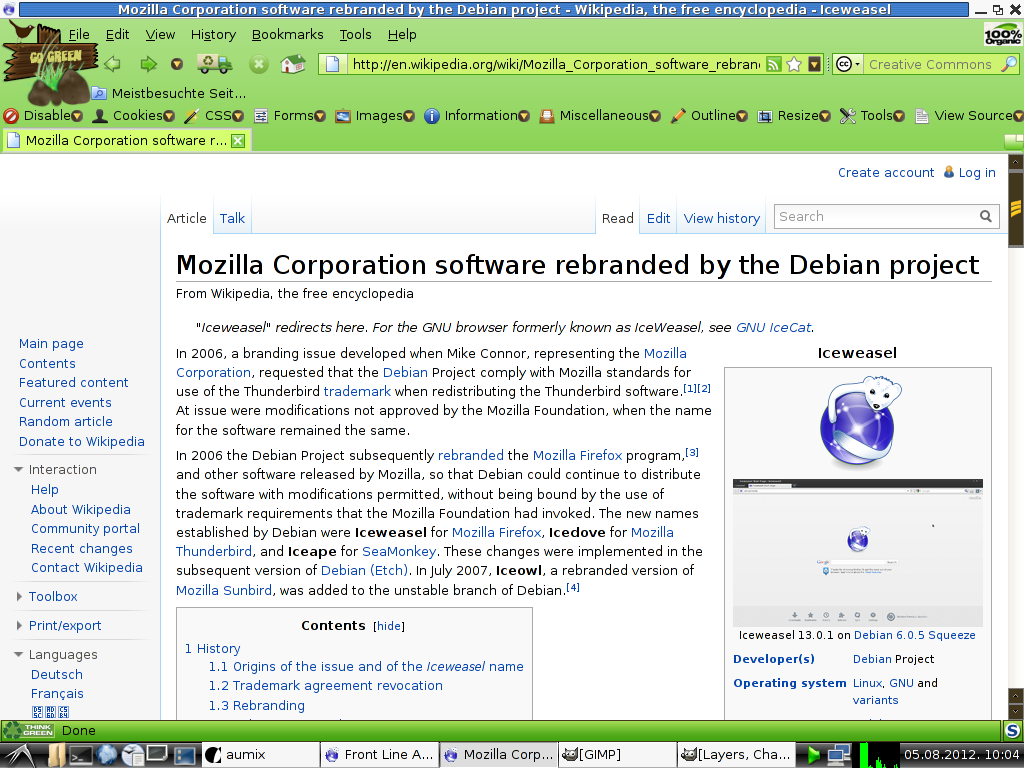
With the Go Green case, the theme has only been made for Windows, but if the browser is compatible, it can also be installed in Linux and for Debian Iceweasel. Case in point:


Click for a bigger image.

Downloading the add-on by name from the Mozilla FTP site

To see if a Linux (or Mac) version of the extension is available, you need to find out the add-on's number at mozilla.org. In some cases it's available already in the extension URL, but I think this nomenclature is being phased out from the web front-end.

If you still don't know what's the number of the addon (if the add-on's address is named and not numbered), you can find it out through its add-on icon or other clues, like links and such. See

View > Page Info > Media

Look for an image, the URL of which matches

/addon_icons/

In that URL, the image's filename starts with a number, like

/13551-64.png

^ 13551 is the number of the add-on (64 is probably the native image width). After that, it's easy to find the add-on via mozilla.org's FTP site:

ftp://ftp.mozilla.org/pub/mozilla.org/addons/13551/

The FTP folder there will then display a list of all release versions of extension or theme installers, which are usually JAR or XPI files. If the installer is a JAR file, and you want to install it for Firefox or Iceweasel, download the extension's installer, rename its extension from .jar to .xpi — and then install it in the browser from the directory it's located in.

And to top it off,

The URL for the Go Green theme's latest installer is this:

http://releases.mozilla.org/pub/mozilla.org/addons/13551/go_green-1.25-fx-win.jar

Friday, June 22, 2012

Cannot play videos on Yahoo! News?

Symptom: This often happens with users of Firefox and other Gecko-based browsers, when:
• they can't show most news videos on the Yahoo! News website and some other Yahoo! properties;
• the commenting system is not functional (can't properly view and post comments).

Privacy-conscious users, and/or those who wish for their browsers to consume less resources, use a script blocking add-on, such as NoScript. I often have NoScript configured to allow/disallow full domains (like d.yimg.com) and not just second-level domains (just yimg.com).

As it often happens, allowing only full subdomains instead of just second-level domains brings with itself more issues.

By default, NoScript includes a whitelist of second-level domains without which major services' functionality would be wholly disabled. The whitelist also contains yahoo.com, yimg.com, and yahoopis.com). The instructions herein are for users who have chosen to impose a more fine-grained control over the websites they visit.


Right, well, I finally played around with NoScript and found a solution:

NoScript:
    In addition to news.yahoo.com and screen.yahoo.com and maybe others, allow the following domains essential for video playback:
  • l.yimg.com
  • d.yimg.com
  • connect.facebook.net (If you're privacy-conscious, then allow temporarily).

  • 11.07.2012. Update: I later discovered that non-video news items also featured videos, so here's an addition of domains that must be allowed:
  • video.query.yahoo.com
  • yep.video.yahoo.com
  • yui.yahooapis.com (important on other Yahoo properties, even if not using video)
  • webplayer.yahooapis.com
Flashblock:
• Allow d.yimg.com
^ Including only that domain in the Flashblock whitelist will have the video area rendered with the Flashblock placeholder. Clicking on it will start playback (note that ads are also played).
• Allow l.yimg.com
^ In regular news items that included video, disallowing l.yimg.com wouldn't even load the Flashblock video placeholder.

If you want video to load automatically, allow the above domains, and news.yahoo.com and screen.yahoo.com (and/or other Yahoo! properties as necessary from the Flashblock toolbar button).

Conclusion

Even if l.yimg.com and d.yimg.com are enabled in NoScript, the crucial part for some erroneous coding reason is connect.facebook.net; If that is not allowed, most video code and commenting functionality won't load. Note that connect.facebook.net is the primary culprit. This has been discussed before at forums.informaction.com (a NoScript and web security forum).

Saturday, March 10, 2012

Cheat sheet and notes for using Knoppix 6 or newer

This I initially made for myself, but then writing got out of hand :-)

For a full-page treatment, see here.


Flash

Knoppix 6.0.1 includes Iceweasel 3.0.6, which does not have support for HTML5 video, so you need to install Flash to watch multimedia. Granted, these versions of Knoppix and Iceweasel are rather outdated, so Knoppix 6.7.1 (or 7) is often a better choice on a new computer.

Another option is to download and install a newer version of Firefox. See below.

The version of Flash compatible with Knoppix 6.0.1 is 10.3. Download it, extract libflashplayer.so into the
/home/knoppix/.mozilla/plugins directory (the plugins directory must also be created). Restart Iceweasel.

02.05.2013. Update

Modern Firefox

By May 2013, Iceweasel 3.0.6 has become so old and outdated that it's not supported by major websites anymore. This includes Google and all its properties (YouTube, Google Drive/Docs, Blogger, and others). The same applies to Yahoo!, twitter, and many other major sites and services.

Using Synaptic in Knoppix 6.0.1 to upgrade to Iceweasel 17 is impractical on account of the Iceweasel 17 package having hundreds of dependencies that must also be upgraded, which really amounts to a whole operating system upgrade. Therefore it's simpler to get the Firefox Linux binary.

The latest official major version of Firefox that still works in Knoppix is version 17, specifically 17 ESR (Extended Support Release). Newer versions won't work.

Firefox 17 ESR can be obtained from Mozilla's FTP site, and I got the latest version here:
ftp://ftp.mozilla.org/pub/mozilla.org/firefox/releases/17.0.6esr/linux-i686/en-US
Since Firefox 17.0 ESR is in active maintenance (17.0.6 released on 09.05.2013., which is very recent), then Mozilla is likely to release newer patchlevel versions.

Since new patchlevel versions are placed in a different FTP directory, then...

...here's a beginner's "navigation how-to" for people unfamiliar with FTP

Primer
FTP (File Transfer Protocol) is older than the web, and it has been very useful in facilitating large downloads. The content of FTP sites is structured hierarchically, as in folders in a computer file system. Files and directories are listed in alphabetical order UNIX-style: directories are not sorted first, but like all other files; items starting with capital letters are at the top of the list, then followed by lower-case items. In a graphical browser, file and folder names are linked and thus clickable.

Mozilla's FTP site
FTP URLs are given as examples
As Mozilla releases a new version of Firefox, then all files specific to a version are given their own directory. Genereally, all Firefox versions are placed in /releases folder of Mozilla's FTP site:
ftp://ftp.mozilla.org/pub/mozilla.org/firefox/releases
The latest version at this time is 17.0.6 and you can scroll down the list to enter that directory:
ftp://ftp.mozilla.org/pub/mozilla.org/firefox/releases/17.0.6esr

As Knoppix is Linux, choose /linux-i686
ftp://ftp.mozilla.org/pub/mozilla.org/firefox/releases/17.0.6esr/linux-i686

What you get in the /linux-i686 directory is a longish folder listing of different Firefox language versions (Firefox is released in many languages), listed in the format of ISO-639-1 two-letter language code followed by ISO 3166-1 alpha-2 two-letter country codes.

The respective code combination for English-United States is en-US
ftp://ftp.mozilla.org/pub/mozilla.org/firefox/releases/17.0.6esr/linux-i686/en-US

There you'll see the archived Firefox binary firefox-17.0.6esr.tar.bz2
ftp://ftp.mozilla.org/pub/mozilla.org/firefox/releases/17.0.6esr/linux-i686/en-US/firefox-17.0.6esr.tar.bz2

Download this file to the Desktop. Once the tar.bz2 file is downloaded, go to the desktop, right-click on the file, choose the Extract > Extract To... command. You'll get a file/location picker and the default should be the Knoppix folder. Press OK to extract.

The Firefox executable is then in the /home/knoppix/firefox/ user directory (knoppix being the user account folder).

Even after Firefox is extracted, a shortcut won't be created to the Knoppix LXDE desktop environment menu.

Do keep in mind that since Iceweasel is code-compatible with Firefox, they both share the same user settings located at /home/knoppix/.mozilla/firefox

It is thus recommended to create a different profile for Firefox.

You can start Firefox from the command line:
knoppix@Microknoppix:~$ ./firefox/firefox -P &

./ stands for specifically targeting a folder from within the current directory;
-P forces the start of the Firefox Profile Manager;
& (ampersand) makes sure that Firefox starts independently from the terminal window.

After that, the Firefox Profile Manager opens up and you can create a new Firefox profile. When doing so, assign a new and simple profile name.

If you close Firefox, you can start Firefox again from the command line using the new profile:
./firefox/firefox -P newprofilename &
Alternately, the easier way is to unset starting Firefox or Iceweasel in a profile automatically. That way it's slightly more user-friendly to choose a profile, at least when starting Iceweasel. Whereas with Firefox only the ./firefox/firefox command without can be used without having to invoke additional command-line options.

So much for now. I might continue and expand on this further.

Thursday, November 24, 2011

Why Iceweasel versions before 2.0 are not Debian-based

One nice day I found a screenshot of Iceweasel that looked like a version prior to Iceweasel 2.0 and added in its description that it was Debian Iceweasel, as browsers named Iceweasel with a lower-case w are usually Debian-based. (As opposed to GNU IceWeasel, which in 2007 was renamed to IceCat to avoid confusion.)

It then turned out for me, this particular screenshot, and other screenshots in the database that it was not so for the reasons that follow.

The uploader of the screenshot had the unintentionally good sense of including the taskbar of the operating environment, which happened to feature a program window with the title of package iceweasel-1.5.0.4-g1-i386. While this got me to get the version number right, the package name was just enough information to start looking further, results of which only pointed to Gnuzilla servers and mirrors. This put me into some doubt as to whether the browser in the screenshot was Debian Iceweasel, and looking even further, my doubts were confirmed.

Locations for iceweasel-1.5.0.4-g1-i386 available here:

From a selective search of most GNU mirrors, I found only one mirror still actually hosting some original files:

ftp://aeneas.mit.edu/pub/gnu/gnuzilla/
http://www.ftpdir.hu/aeneas.mit.edu/pub/gnu/gnuzilla/

The relevant binary files there were last modified on 06.09.2006 00:00.

From the Internet Archive I found another mirror which has hosted iceweasel-1.5.0.4-g1-i386:

web.archive.org/web/20070507153807/http://ftp.download-by.net/gnu/gnu/gnuzilla/
(also features a later capture)

The binaries were last modified on 05.09.2006 23:59, so a minute earlier than those at aeneas.mit.edu.

Note that researching this kind of history through the Internet Archive has three or so limits:
* I tested to see if only an HTTP mirror had an archive page. Although I did not try to see if the WayBack Machine archives FTP pages, too, I didn't find any necessity for it either; Assuming also that the WayBack Machine does not archive FTP folder listings in the first place;
* The Archive has its own exclusion list of servers that it won't crawl (limited in relation to the GNU mirror list);
* Many mirrors had blocked crawling through robots.txt, as mirrors anyway host large files, which can be taxing to the Internet Archive. It's still useful for the WayBack Machine to archive programs — especially device drivers and obscure program packages, because the Internet Archive can sometimes be the only place where these can be found.

Through my searching whether an HTTP mirror has an archive page, then in the process a substantial number of those ftp-as-http mirrors that allowed crawling had their /gnuzilla folders captured by the Internet Archive. This should serve useful at tracing browser history with a similar method in any possible future research.

No other mirror services in the list of GNU mirrors that I searched at contained the original packages of iceweasel-1.5.0.4-g1-i386.

Left out from the search:
- South America: Brazil /only country in the list;
- Africa: South Africa;
- Asia: Bangladesh, China, Japan, Malaysia, Oman, Pakistan;
- Europe: Greece, Portugal, Spain.

(Funny, Israel was in Asia, too :-)

There were two reasons for leaving these countries out of my search: Either a non-sensical URL (which I couldn't recognize as something resembling legitimacy), or the country is not trustworthy enough to visit its websites, no matter how harmless on appearance. The amount of servers not checked was approximately 10-15%, based on guesswork.

A user-published package of 1.5.0.8pre2 available at safeweb.sitesled.com/iceweasel

Now, Debian started including Iceweasel as a rebranded replacement of Mozilla Firefox only since version 2.0, after which GNU slightly renamed their package to IceWeasel (note capitalisation of W), then a year later renamed their package to IceCat to finally avoid confusion with Debian's own package.

In conclusion, all Iceweasel versions prior to 2.0 are Gnuzilla-based.

I had to add to that screenshot file's notes that this was a screenshot of a Gnuzilla-based Iceweasel and not one of a Debian-based Iceweasel. The GNU IceCat Wikipedia page was also of great help in determining the right source.